Tutorial: Setting up Mellum focal model on VsCode with Continue
tutorial ollama continue vs-Code jetbrains
With Mellum launching as an open source model1, I found a good opportunity to test it against my current Unity learning2 workflow. Rider/Unity runs slowly, so VS Code is my go to, and this week I have read two posts that align with that flow. Resharper is in public preview in VS Code 3, and Mellum is now open source1.
Tutorial: Setting Up and Running Mellum
- Clone the Mellum model files
git clone https://huggingface.co/JetBrains/Mellum-4b-base-gguf(~4.5 GB)1
-
Install Ollama4 Download and install the appropriate Ollama package for your OS (Ollama, 2025).
-
Install Continue5 in VS Code Add the Continue extension to wire up Mellum via Ollama.
Add Mellum to Ollama
- In your project directory, create a file named
Modelfilewith:
FROM ./mellum-4b-base.Q8_0.gguf
# PARAMETER <parameter> <value>

SYSTEM "You are a completion assistant. Predict the most likely continuation of the given input accurately and concisely."

PARAMETER temperature      0.2
PARAMETER top_p            0.9
PARAMETER top_k            40
PARAMETER repeat_penalty   1.2
PARAMETER repeat_last_n    128
PARAMETER num_predict      512
PARAMETER num_ctx          8192

PARAMETER stop "###"
PARAMETER stop "\n\n"
All of these directives and parameters come from the Ollama Modelfile6
- (Optional) To run a quantized build on modest hardware at the expense of some accuracy, see Ollama’s quantization guide:
- Create your Ollama model
ollama create Mellum -f .\ModelfileMake sure the FROM base matches the one used to the Model file (Chang, n.d.).
- Inspect default values
ollama show MellumYou’ll see something like:
 Model
    architecture        llama
    parameters          4.0B
    context length      8192
    embedding length    3072
    quantization        Q8_0

  Capabilities
    completion

  Parameters
    top_k             40
    top_p             0.9
    num_ctx           8192
    num_predict       512
    repeat_last_n     128
    repeat_penalty    1.2
    stop              "###"
    stop              "\n\n"
    temperature       0.2
Tweak any settings in your Modelfile, then rebuild with ollama create as above.
VS Code, Continue & Ollama
Continue5 lets you hook any local or remote model into VS Code, select Ollama as your provider, then Add a Local Model even though it isn’t in the Ollama registry by default. Configure per-context assistants from the Continue UI, and you’ll get Mellum focal context completions right in VS Code.
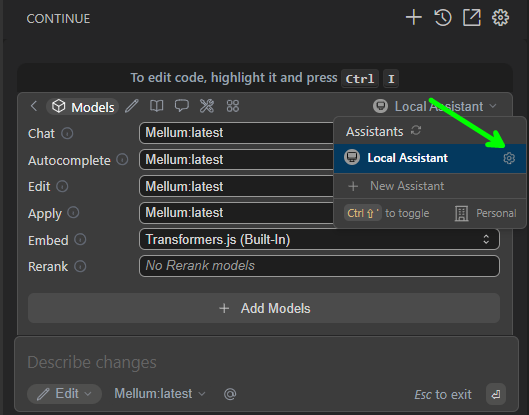
Overall, on my station with a dedicated GPU it’s fast, but on smaller machines you can quantize the model to fit your needs. Now I can zip between Unity and VS Code with context-aware completions via Mellum.
In continue configured for each context available here are some insights
Footnotes
-
JetBrains. (2025b, April). Mellum goes open source: A purpose‐built LLM for developers, now on Hugging Face. JetBrains Blog. Retrieved May 21, 2025, from https://blog.jetbrains.com/ai/2025/04/mellum-goes-open-source-a-purpose-built-llm-for-developers-now-on-hugging-face/ ↩ ↩2 ↩3 ↩4
-
YouTube. (n.d.). How To Make a 3D Space Shooter Game in Unity – Tutorial [Video]. YouTube. Retrieved May 21, 2025, from https://www.youtube.com/watch?v=VW3PkEF1Fzk ↩ ↩2
-
JetBrains. (2025f, May). ReSharper for Visual Studio Code [Extension]. Visual Studio Marketplace. Retrieved May 21, 2025, from https://marketplace.visualstudio.com/items?itemName=jetbrains.resharper-code ↩ ↩2
-
Ollama. (2025). Download Ollama on Windows [Software]. Retrieved May 21, 2025, from https://ollama.com/download/windows ↩ ↩2
-
Continue.dev. (2025). Continue – Open-source AI code assistant [Extension]. Visual Studio Marketplace. Retrieved May 21, 2025, from https://marketplace.visualstudio.com/items?itemName=Continue.continue ↩ ↩2 ↩3
-
Chang, L. (n.d.). Model file specification Ollama [Documentation]. GitHub. Retrieved May 21, 2025, from https://github.com/lloydchang/ollama-ollama/blob/main/docs/modelfile.md ↩ ↩2
-
JetBrains. (2025a, February). Why and how JetBrains built Mellum – the LLM designed for code completion. JetBrains Blog. Retrieved May 21, 2025, from https://blog.jetbrains.com/ai/2025/02/why-and-how-jetbrains-built-mellum-the-llm-designed-for-code-completion/ ↩
-
JetBrains. (2025c, April 8). JetBrains Mellum overview & usage [IDE Services documentation]. Retrieved May 21, 2025, from https://www.jetbrains.com/help/ide-services/jetbrains-mellum.html ↩
-
JetBrains. (2025d, May). JetBrains AI Assistant – now in Visual Studio Code. JetBrains Blog. Retrieved May 21, 2025, from https://blog.jetbrains.com/ai/2025/05/jetbrains-ai-assistant-now-in-visual-studio-code/ ↩
-
JetBrains. (2025e). Mellum-4b-base-gguf [Model]. Hugging Face. Retrieved May 21, 2025, from https://huggingface.co/JetBrains/Mellum-4b-base-gguf ↩